- Introduction
- Why SASE Readiness Starts With Access
- What VPN Can And Cannot Do
- Why Identity Is The New Perimeter
- Old Perimeter Vs. SASE-Ready Access
- Why A Blueprint-Led SASE Plan Reduces Rollout Risk
- Signs You May Need A SASE Readiness Review
- How To Build A Safer Rollout
- Why Compliance Raises The Pressure
- What A SASE Readiness Assessment Should Review
- The Next Perimeter Must Follow The Work
- FAQs
Introduction
Work no longer happens inside a perimeter.
It happens across cloud platforms, mobile devices, branch networks, home routers, SaaS apps, partner portals, and personal Wi-Fi.
A plant manager checks a production dashboard from home. A clinician opens records on a tablet. A finance lead approves payroll from hotel Wi-Fi. Meanwhile, a contractor may use a cloud app from another state.
Data now moves through SaaS apps, APIs, cloud platforms, mobile devices, and partner systems every day.
That is how work runs now.
Yet many companies still protect access with a design from another era. The old model assumed that users worked inside the office, apps lived in the data center, and company devices stayed on trusted networks. So IT placed firewalls at the edge, routed remote users through VPN, and treated the office network as the safe zone.
That safe zone has faded.
So IT leaders face a harder question now.
How do teams secure access when users, apps, and data no longer stay in one place?
That is where SASE readiness starts. The access problem is no longer only a network issue. It is now a user, data, risk, and operations issue.
Why SASE Readiness Starts With Access
The old perimeter worked when the business had a clear edge. Teams once worked from predictable locations, applications stayed behind company-controlled systems, and traffic moved through routes IT could see, manage, and audit.
That version of work has changed.
Now a user may open Microsoft 365, Salesforce, an ERP cloud, a healthcare platform, or a manufacturing portal without touching the corporate network. A device may connect from a home router, a branch network, a mobile hotspot, or a third-party site.
Also, one workflow may cross several vendors before the job ends.
This creates a gap between how the business runs and how the network still tries to protect it.
Legacy perimeter security focuses on location. Modern access risk comes from identity, device health, app behavior, data exposure, and user context. A firewall at the office edge cannot see every cloud action. A VPN cannot inspect every SaaS session. A data center path cannot serve every remote user well.
As a result, the access model starts to feel slow and messy. Users complain. Teams add exceptions. Cloud apps bypass inspection. Security rules spread across tools. Audit logs take longer to trace.
Over time, IT gets more work and less control.
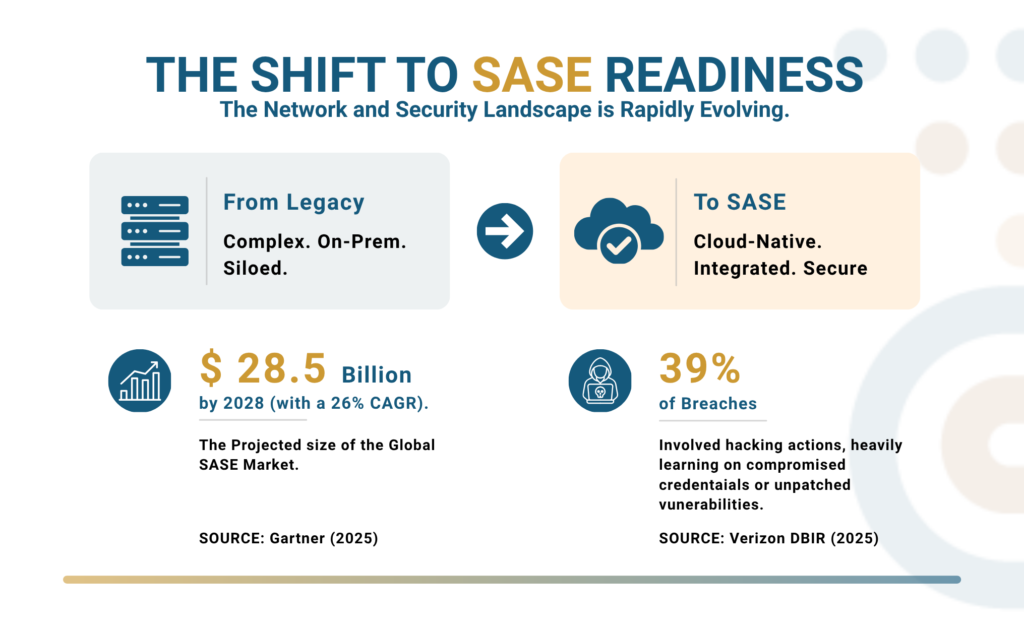
Gartner estimated in 2025 that the global SASE market will reach $28.5 billion by 2028, with a 26% compound annual growth rate. That growth shows how fast access security is moving away from old perimeter designs.
SASE readiness helps leaders see the gap before it grows. It also helps them avoid buying tools before they map the access problem.
What VPN Can And Cannot Do
VPN still has a place. Some private systems may need it during transition. However, VPN should not carry the full weight of modern access.
VPN extends network access. Modern security needs application access.
That difference changes the design. A VPN often lets users into a network segment. From there, IT must control what they can reach.
Instead, a better model checks who the user is, what device they use, which app they request, what risk signals appear, and what data the session may expose.
That gives IT sharper control.
VPN also creates daily drag. IT teams handle client issues, tunnel drops, routing conflicts, split tunneling debates, appliance capacity, and poor user speed. Each ticket may look small. Together, they pull time away from cleaner design and stronger controls.
SASE readiness does not say, “Remove VPN tomorrow.” It asks a better question: where does VPN still help, and where does it now create risk, delay, or blind spots?
A VPN-first model can hide risk behind normal access. A readiness plan shows where that risk starts.
Why Identity Is The New Perimeter
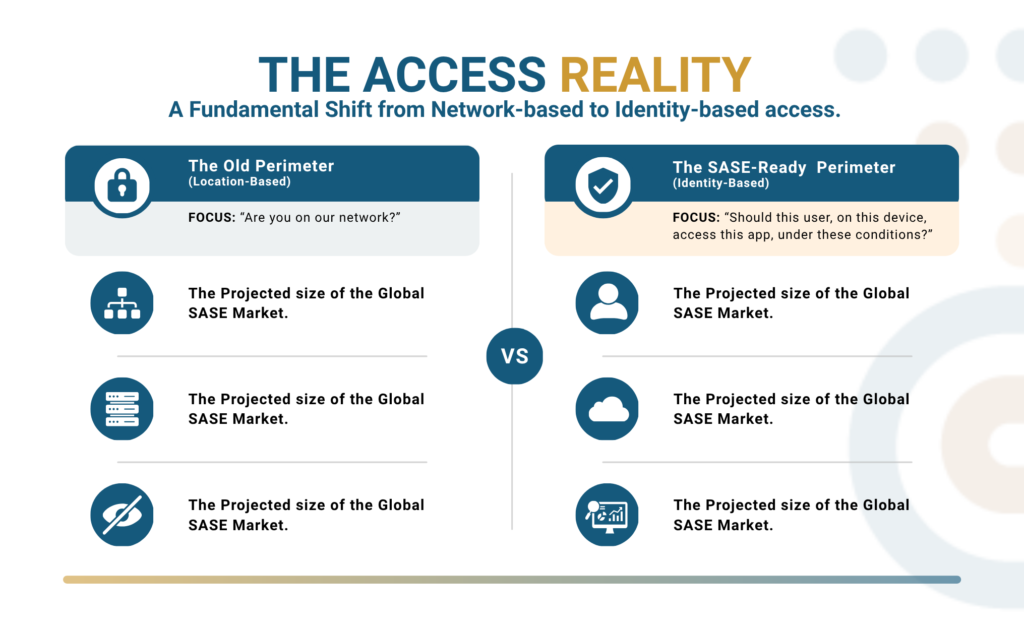
The new perimeter does not surround a building. It surrounds each access decision.
First, IT verifies identity. Next, it checks device trust, application access, session context, data rules, and traffic behavior.
In plain terms, the business stops asking, “Is this user on our network?” and starts asking, “Should this user, on this device, access this app, under these conditions?”
That shift drives Zero Trust and SASE.
The Verizon 2025 Data Breach Investigations Report found that 39% of breaches involved hacking actions, often through stolen credentials or exploited vulnerabilities. This is why identity, device posture, and exposed access paths need one review, not separate projects.
SASE, or Secure Access Service Edge, brings network and security controls into a cloud-delivered model. Rather than forcing every user through one old route, SASE applies policy closer to where users and applications work.
For IT leaders, SASE readiness is not about adding another product to the stack. It checks whether the current access model can support the business that already exists.
Old Perimeter Vs. SASE-Ready Access
| Access Area | Old Perimeter Approach | SASE Readiness Question | Business Impact | Risk Impact | Operational Impact |
| Remote Users | VPN into the network | Which apps do users need, and under what risk conditions? | Better remote work experience | Less broad network exposure | Fewer VPN tickets |
| Cloud Apps | Limited view after login | Can IT see and control SaaS activity? | Safer cloud adoption | Less shadow SaaS risk | Cleaner app monitoring |
| Branch Sites | Hardware-heavy security stack | Can branches connect through secure cloud policy? | Faster branch upgrades | Less appliance exposure | Easier policy updates |
| Contractors | Broad temporary access | Can access stay limited to approved apps only? | Safer third-party work | Lower vendor access risk | Faster access removal |
| Compliance | Manual proof and scattered logs | Can teams show who accessed what and when? | Stronger audit readiness | Fewer evidence gaps | Faster reporting |
| User Experience | Backhauled traffic and delay | Can access improve without weaker control? | Better output | Fewer risky workarounds | Less support pressure |
The network perimeter disappeared because work moved.
This is why SASE readiness should begin with business access, not vendor selection.
Why A Blueprint-Led SASE Plan Reduces Rollout Risk
SASE projects often fail when teams treat them like a tool change.
At first, the rollout may look simple. Then the real issues appear. A key app slows down. A clinic workflow breaks. A branch team reports poor speed. A contractor still has more access than needed. Soon, IT has a security project that now feels like an operations problem.
Start With The Business Access Map
Therefore, Consltek uses a blueprint-led SASE approach. The goal is not to deploy technology first and clean up later. Instead, the plan starts with the business access map.
First, IT reviews who needs access. Next, the team checks which apps they use. Then, it looks at devices, locations, data paths, and risk signals. After that, leaders can see which access problems need faster action and which ones can wait.
Review Real Workflows Before Rollout
Also, every access change affects real work. For example, a small routing change can affect a production line, a remote finance user, a patient care workflow, or a partner portal. However, a readiness review helps IT find those weak spots before the rollout begins.
Likewise, high-risk users need early review. Admins, contractors, remote employees, and third-party support teams often create the largest access gaps. In addition, old VPN groups and firewall rules may still carry permissions nobody has reviewed in months.
Give Leadership A Safer Order Of Change
As a result, the team gets a safer order of change. More importantly, leadership gets a clear reason for each phase.
By contrast, a tool-first project can create confusion. Meanwhile, a blueprint-led plan shows what to fix first, what to test next, and what to keep stable until the business can support the change.
Finally, SASE readiness turns access pain into a modernization plan that IT, security, compliance, and operations teams can support.
Blueprint Note: SASE readiness turns access pain into a plan, so leaders can see what to fix first.
Signs You May Need A SASE Readiness Review
Use this quick check before a larger rollout.
| Sign | What It Usually Means |
| Remote users complain about VPN speed | Traffic may be taking old paths that no longer fit cloud access. |
| Teams ask for access exceptions often | Existing policies may be too broad or hard to manage. |
| SaaS usage is hard to track | IT may not have enough cloud app visibility. |
| Contractors have wide network access | Third-party access may need app-level control. |
| Audit evidence takes too long to collect | Logs and access records may spread across too many systems. |
| Branch security depends on aging appliances | The network may need cloud-delivered security controls. |
| VPN groups have not been reviewed in months | Over-permissioned access may already exist. |
These signs often look like daily IT noise. However, they point to a deeper access design problem.
When users, apps, and data keep moving, old controls need more exceptions just to keep work moving. That is a warning sign.
How To Build A Safer Rollout
A safer SASE rollout starts before the first policy change.
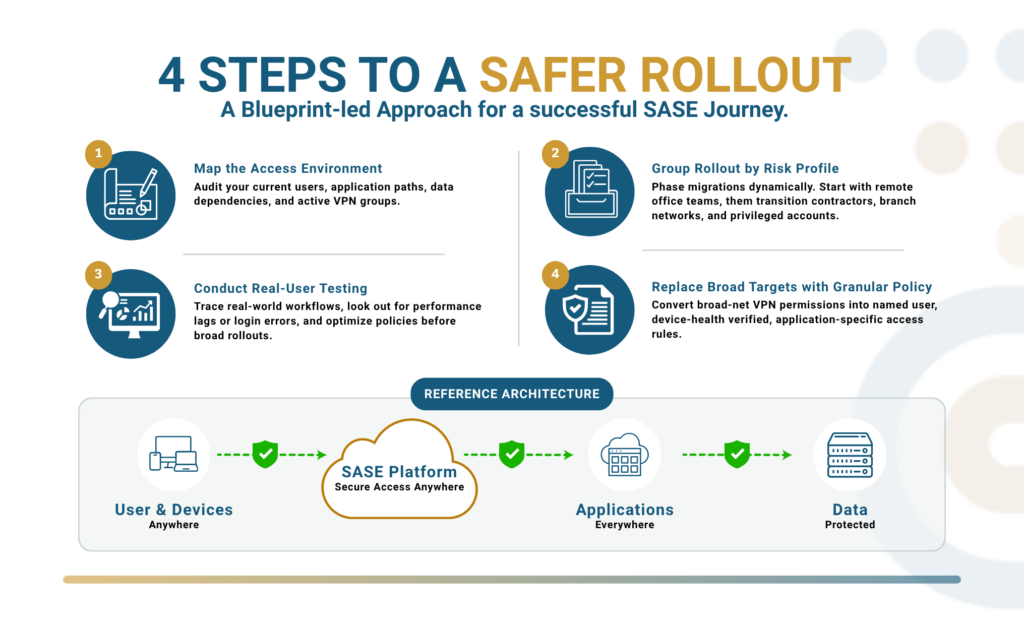
Before IT moves users, the team should map the current access path. Who connects? Which apps do they use each day? Where do they connect from?Which systems contain sensitive data? Which teams already complain about VPN speed or dropped sessions?
Group The Rollout By Risk
Once those answers are clear, IT can group the rollout by risk and business impact. For instance, one phase may cover remote office staff. Another phase may cover contractors. Later, the team can move branch users, privileged users, or legacy private apps.
Test With Real Users
During each phase, test access with real users. Then watch performance, blocked traffic, login errors, and support tickets. If a workflow breaks, fix it before adding the next group. This keeps the project controlled.
Replace Broad Access With Cleaner Policy
At the same time, review policy quality. Broad VPN access should become app-level access. Shared access should move toward named users. Weak authentication should move toward stronger identity checks. Missing logs should become clear access records.
Show Progress In Business Terms
In practice, this gives IT a better story for leadership. Instead of saying, “We are replacing VPN,” the team can say, “We are reducing broad access, improving user experience, and closing compliance gaps in phases.”
Because each phase has a clear purpose, the business sees progress without major disruption.
When the rollout follows a blueprint, SASE becomes easier to defend. It protects users, supports cloud work, reduces access risk, and gives leaders proof that modernization is moving in the right order.
For more context on SASE architecture and VPN modernization, read Consltek’s guide, The Complete Guide To SASE For Small And Mid-Size Businesses In 2026.
Why Compliance Raises The Pressure
For healthcare, manufacturing, and education, access control now affects more than uptime. It affects audits, cyber insurance reviews, client trust, and breach response.
A healthcare provider may need to show how remote access protects patient data under HIPAA. A manufacturer may need stronger vendor access control for SOC 2 or client security reviews. A retailer or service provider may need cleaner access records for PCI DSS.
A regulated organization may also align access controls to NIST guidance.
For example, a user with too much access can expose sensitive records. Meanwhile, a contractor account can increase vendor risk. In addition, a weak remote access path can give attackers a route into internal systems.
Even one missing log can weaken an audit response.
As a result, access control has become a business risk topic. Boards and insurers now ask sharper questions.
Who can reach sensitive apps? Which devices can connect? What controls stop risky sessions? How fast can IT remove access? Which logs support the answer?
That is why SASE readiness should come before a larger rollout.
Audit proof is easier to build when access rules, user identity, device trust, and logs follow the same plan.
What A SASE Readiness Assessment Should Review
A useful SASE readiness assessment should not begin with a product demo. Instead, it should begin with the current access environment.
First, review remote access usage and VPN dependency. Next, list critical apps, private apps, and SaaS platforms. Then, map user groups, roles, and privileged access.
After that, check device trust, endpoint health, branch traffic, and cloud paths.
The review should also cover data exposure, compliance needs, user friction, and migration risks. From there, IT can see which access issues need urgent action and which ones can move into later phases.
This gives IT a clean starting point.
It also helps separate quick fixes from larger design changes. For some teams, the first step may be reducing VPN exposure. For others, the gap may come from SaaS visibility or branch modernization.
To connect SASE readiness with Zero Trust, review Consltek’s SASE implementation and ZTNA-based access page.
The Next Perimeter Must Follow The Work
The perimeter disappeared because work moved. Users moved into hybrid patterns. Apps moved into cloud platforms. Data moved through more tools. Devices multiplied. Partners gained more access. Cloud became the daily workspace.
Trying to stretch the old model creates more cost, more friction, and more risk.
SASE gives IT leaders a practical way to build a new access layer around how work happens now. It brings identity, cloud security, network performance, policy, and visibility into one access strategy.
However, the right path does not need to break the business. It needs a clear starting point, a phased rollout, and proof that each change improves security without hurting operations.
Book a SASE Readiness Assessment with Consltek to get a clear picture of current access risk, user-to-application mapping, VPN dependency, compliance gaps, and a phased modernization roadmap that shows what to fix first without disrupting the business.
FAQs
Is SASE Only For Large Enterprises?
No. Mid-size teams often need SASE readiness because they run cloud apps, remote access, branch networks, and contractor access with lean IT staff. The key is to phase the rollout instead of copying an enterprise program.
How Is SASE Readiness Different From Buying SASE?
Buying SASE starts with tools. SASE readiness starts with users, apps, access paths, risk, and business impact. It helps leaders choose the right order of change before rollout begins.
Can SASE Work With Existing SD-WAN?
Yes. Many teams connect SASE planning with SD-WAN because both affect branch traffic and user experience. A readiness review can show where SD-WAN supports the access plan and where added security controls are needed.
What Comes First In A SASE Migration?
Start with access mapping. List users, apps, locations, devices, and data paths. Then identify high-risk groups and poor user experiences. This makes the first phase easier to test and defend.
How Does SASE Support HIPAA Or SOC 2 Reviews?
SASE can help teams show who accessed which app, from what device, and under which policy. That can support HIPAA, SOC 2, PCI DSS, NIST-aligned reviews, cyber insurance checks, and client security reviews.